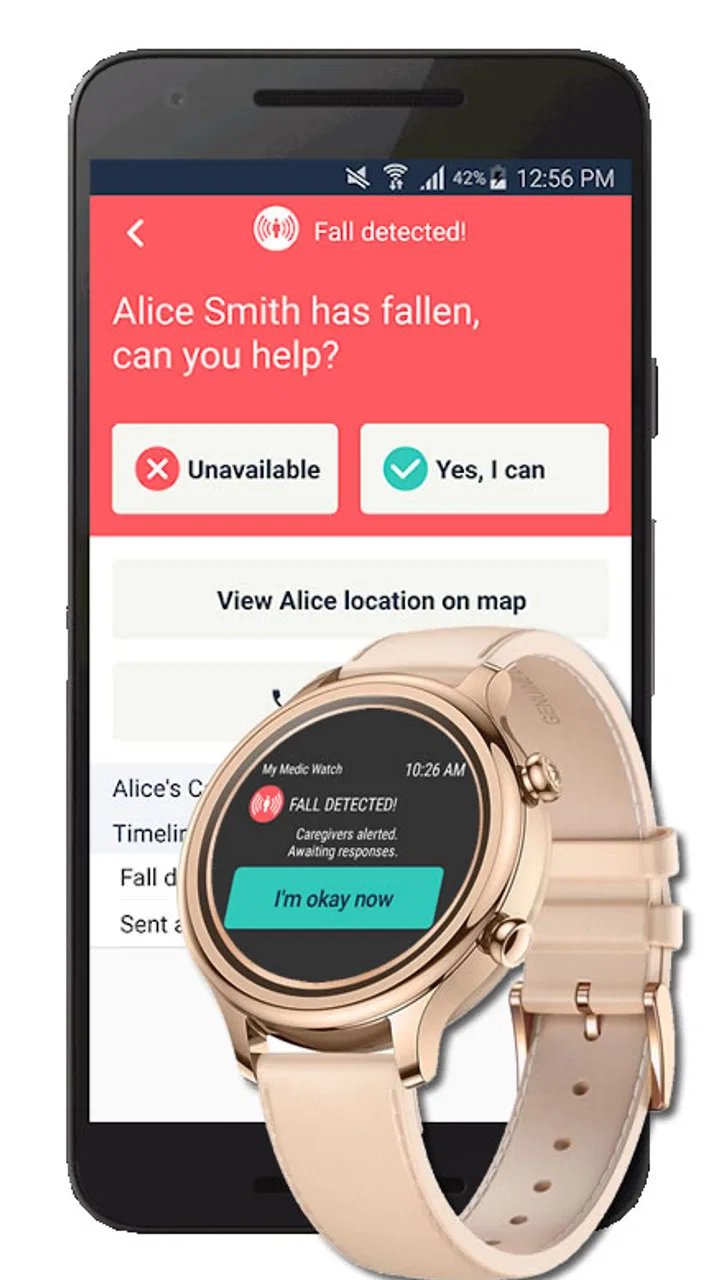
Fall Alert – My Medic Watch
- 3.1
- Rating
- 10.00K
- Installs
- Free
- Price

 Analysis by App-foxy
When a medical safety app is built around fall detection, trust matters more to me than a polished interface. I can forgive a little friction in a normal utility, but I do not want to make assumptions about an alert tool that might be used after an accident. Fall Alert – My Medic Watch is aimed at that very specific concern: helping detect a fall automatically and turning the phone into part of a personal safety routine. I reviewed it with that practical question in mind: does it make sense for everyday protection, and can a person use it without losing sight of its limits?
The app is free to install and belongs to the medical category. It is made by My Medic Watch, has an Everyone age rating, and has reached over ten thousand installs. Its average rating sits at 3.1 from around seventy ratings, with a little over twenty written reviews. Those figures suggest a product that has found a real audience but has not earned universal confidence. I would treat that as a reason to test it carefully rather than dismiss it outright.
What Fall Alert is trying to solve
The basic idea is straightforward. A fall can happen when someone is alone, disoriented, injured, or unable to reach a phone quickly. A conventional emergency call depends on the person noticing the danger, deciding what to do, and physically interacting with the device. Automatic fall detection tries to reduce those steps. That is the central value of this app, and it is also why expectations need to stay realistic.
You May Also Like

 Pandora - Music & Podcasts
Pandora’s Music Is Easy to Start, but Harder to Recover
Pandora’s strength is its low-effort path from a seed to a station. Its weak spot is how much confidence it asks you to place in connection, setup, and quiet recovery.

 AccuWeather: Weather Radar
AccuWeather Review: A Quick, Clear Forecast for Everyday Decisions
For everyday plans, the best forecast is the one you can understand quickly. AccuWeather makes rain timing, radar, and local conditions easy to act on, with a few trade-offs.

 Hill Climb Racing
Why Hill Climb Racing Still Turns Crashes Into One More Run
A tiny car, a bumpy hill and one more upgrade: Hill Climb Racing keeps resurfacing because its simple chaos makes every near-miss feel personal.

 AliExpress - Shopping App
AliExpress Makes Global Shopping Feel Personal, but Shoppers Bear the Risk
AliExpress turns a global marketplace into a pocket-sized discovery engine. Its reach is useful, its shopping loop compelling, and its trade-offs easy to miss.

 Lords Mobile: Kingdom Wars
Lords Mobile Is a Kingdom-Building Routine, Not a Quick Match
A case-by-case verdict on the building, battles, device demands, and social commitments that make Lords Mobile rewarding for some players and exhausting for others.

 PDF Scanner app - TapScanner
TapScanner Makes Paperwork Easier to Capture, Check, and Share
TapScanner makes scanning with a phone feel less like a rescue operation and more like a dependable step in getting work done. Its capture tools are useful, though not flawless.
More From Our News Desk
View All News


I see the strongest use case in a person who spends meaningful periods alone and wants an additional layer of awareness around their phone. That might include an older adult, someone recovering from an injury, or a person whose family worries about falls during ordinary activities. It can also be useful for a caregiver who wants to encourage a safety habit without requiring the user to operate a complicated medical system.
At the same time, I would not present it as a replacement for emergency services, supervision, medical advice, or a dedicated monitored alarm arrangement. A phone-based detector depends on the phone being available and able to function at the moment it is needed. Carrying habits, battery condition, connectivity, body movement, and the circumstances of the fall all matter. The app is best understood as a supporting tool, not a guarantee.
A realistic everyday scenario
Imagine someone who keeps the phone in a pocket while moving around the home, then slips near the kitchen or bathroom. The useful part of automatic detection is that the first response does not have to begin with unlocking the screen and finding a contact. If the app recognizes the event, it can become a prompt to act during a moment when the person may be confused or embarrassed.
That scenario also shows the practical preparation required. The user should decide where the phone will normally be carried, make sure the app is allowed to operate as intended, and explain to a trusted person what an alert could mean. Installing it and forgetting about it is not a safety plan. A short trial during normal movement is more valuable than assuming the feature will behave perfectly in every situation.
Who should consider it, and who should skip it
I would consider Fall Alert for someone who wants a free starting point and is willing to build a routine around keeping a phone close. The free entry makes experimentation easier, especially for families who want to see whether an automatic fall tool fits a particular person’s habits before spending money on equipment.
I would be more cautious for a person who regularly leaves the phone in another room, cannot reliably respond to prompts, or needs guaranteed professional monitoring. Someone with a high medical risk may be better served by a dedicated medical alert device or a service designed around continuous human response. A smartwatch may also be a better match for a person who wears it consistently and wants sensing on the body rather than relying mainly on phone placement.
The comparison with ordinary alternatives is important. Calling a family member manually is simpler and more familiar, but it requires the user to be able to initiate the call. A general phone emergency function is useful for urgent situations, yet it is not the same as a fall-focused workflow. Dedicated alert hardware can be more dependable for some users because it is designed to stay on the person, although it may involve equipment, subscriptions, or a different setup burden. Fall Alert occupies the middle ground: more specialized than a normal call, but less purpose-built than a complete monitored system.
Trust, controls, and the moments that need care
I use this section to focus on the practical checks that make a fall-alert routine more dependable: understanding the phone’s controls, agreeing on who responds, and knowing when a prompt calls for immediate attention. Those habits matter because an alert is only useful when the person carrying the phone and the people around them share the same expectations. Next, I turn to the everyday patterns that can make those checks easier to maintain.
What I would verify before relying on it
With a medical app, I would begin with visible controls rather than the promotional promise. I want to know what the app asks me to enable, when it expects to be active, and how it lets me respond after a possible fall. I would also look for clear choices around contacts, notifications, account access, and any service connected to the alert process. If a screen presents an option I do not understand, I would pause instead of accepting it automatically.
The current version is F-2.2.11, so I would check that the installed version matches the current release shown in the app store before testing. That is not a guarantee of performance, but it avoids evaluating an outdated build. I would also review the phone’s own battery and background-activity settings. A fall detector that is restricted by aggressive power saving may not behave as the user expects.
My practical test would be modest and controlled. I would not stage a dangerous fall. Instead, I would walk through the normal routine, observe when the app is active, and confirm that any visible alert or prompt is understandable. I would then discuss the response plan with the person who may receive an alert. This is one of the less obvious but most important steps: an alert only helps if the recipient knows how to interpret it and what to do next.
Permissions and data-sensitive moments
Fall detection is inherently sensitive because it concerns movement, health-related circumstances, and potentially the identity of people who may be contacted. I would read every permission request in context and grant only what is necessary for the app’s intended operation. I would not treat an automatic approval flow as proof that all access is harmless.
There are several moments when privacy deserves extra attention. The first is setup, when the app may ask for access needed to observe activity or send notifications. The second is when a user adds another person to the response chain. That person should know why their details are being used and what kind of message they might receive. The third is any paid or account-related screen, where I would check exactly what I am agreeing to before continuing.
Because the app includes in-app purchases ranging from a few dollars to around one hundred and thirty dollars per item, I would be especially careful with payment prompts. The free installation does not mean every related service or option is free. I would look at the wording of each purchase screen, confirm whether it is a one-time item or part of an ongoing arrangement, and avoid entering payment details until the purpose is clear. That small pause is worthwhile in a medical context.
I would also avoid sharing more personal information than the safety workflow requires. If the app offers optional profile fields or additional account details, I would consider whether each one improves the service for this particular user. A family member helping with setup should explain the choices in plain language, especially if the user is uncomfortable with apps or has difficulty reading small text.
User agency after a possible fall
Automatic detection should not remove the user’s ability to correct a mistake. False alarms are a real trade-off in movement-based systems: a sudden sit-down, dropped phone, or unusual activity may look different from a genuine fall. A good routine therefore includes learning what the app asks the user to do after detection and how much time there is to respond.
I would practice that response without creating danger. The goal is not to trick the detector, but to make sure the user recognizes an alert, understands whether they can cancel it, and knows what happens if they do nothing. If the wording is confusing, the font is difficult to read, or the user cannot remember the steps, that is a meaningful reason to choose another solution.
Caregivers should preserve the user’s control wherever possible. Setting up an app on someone else’s phone can easily become a process where choices are made for them. I would explain each alert contact, notification, and purchase decision, then let the user approve the arrangement. That approach is not just respectful; it also makes the routine more likely to be followed consistently.
Where the convenience can break down
The biggest weakness is the gap between detecting an event and delivering useful help. The phone has to be with the user, the app has to be able to operate, and the person or service on the other end has to be reachable. A user who leaves the device charging overnight in a hallway may have a very different level of protection from someone who carries it during every walk around the house.
False positives are another source of friction. Even when an app provides a way to dismiss an alert, repeated interruptions can make a user stop paying attention. That is why I would judge it over a realistic trial period rather than after one successful setup. If alerts are difficult to understand or occur at inconvenient moments, the safety habit may weaken.
The rating of 3.1 indicates that the experience has not been consistently smooth for everyone. I would not use that average as a technical verdict, because ratings can reflect different phones, expectations, and personal circumstances. Still, it is a useful reminder to test the app on the actual device and with the actual user who will depend on it. A family member’s successful setup does not automatically predict the older relative’s experience.
How I would set it up responsibly
I would begin by installing the free app from the official platform listing and checking the developer name, My Medic Watch, before proceeding. I would read the initial screens slowly, record which permissions are requested, and note whether the app explains its alert behavior clearly. I would then choose the smallest practical set of contacts and make sure those people agree to participate.
Next, I would establish a carrying rule: for example, the phone stays in a pocket or another position that makes sense for the user’s normal movement. I would avoid placing it on a distant table and then assuming automatic detection covers the whole home. I would also charge the device routinely and review notification and battery settings after major phone updates.
Finally, I would rehearse the human side. The user should know how to recognize a possible alert, how to respond, and when to call emergency services directly. The contact should know that an alert may require a phone call or another agreed check-in rather than an immediate assumption about the person’s condition. This simple agreement is one of the most useful improvements a family can make, and it does not depend on adding another feature.
My cautious verdict
I find Fall Alert – My Medic Watch worth considering as a low-cost experiment for people who want automatic fall detection and are prepared to keep their phone close. Its free price lowers the barrier to trying it, while the medical focus makes it more relevant than a generic safety shortcut. The app can fit naturally into a family safety plan when everyone understands what it can and cannot do.
My recommendation is conditional, not absolute. I would choose it for a user who can manage the phone, respond to an alert, and accept the responsibility of testing the setup. I would skip it as the sole protection for someone who needs guaranteed monitoring, has difficulty carrying a phone, or cannot reliably handle an alert prompt. In those cases, a wearable or dedicated medical alert service may be the more appropriate investment.
The most important takeaway is simple: automatic fall detection is only one part of a dependable safety routine. Before relying on this app, I would verify the visible permissions and account choices, understand the purchase screens, agree on an alert-response plan, and test the everyday carrying habit. If those conditions fit the user, Fall Alert offers a sensible place to begin. If they do not, choosing a more specialized alternative is not overcautious; it is the honest decision.
FAQs for Fall Alert – My Medic Watch
01What is Fall Alert – My Medic Watch designed to do?
Fall Alert – My Medic Watch is designed to help detect a possible fall and connect the wearer with assistance when they may be unable to reach a phone. It is aimed mainly at older adults, people living alone, and users with mobility or health concerns. The app can support safety monitoring, but it should be considered an additional tool rather than a replacement for emergency services, medical supervision, or a personal care plan.
02How does Fall Alert – My Medic Watch detect a fall?
The service generally uses compatible wearable technology and motion sensors to identify movement patterns that may indicate a fall. After a suspected incident, the user may be prompted to confirm whether help is needed, depending on the device and configured settings. Fall detection is not guaranteed in every situation: slow collapses, unusual movements, poor device placement, limited battery, or a disconnected phone can affect performance.
03Does the app automatically contact emergency services after a fall?
Whether emergency services are contacted automatically depends on the My Medic Watch plan, the wearable device, regional availability, and the emergency response settings configured in the account. In some cases, an alert may first be sent to a monitoring center or nominated contacts. Before relying on the app, carefully check the response process, supported countries, subscription requirements, and whether the user must respond to an alert manually.
04What permissions and equipment does Fall Alert – My Medic Watch require?
The app may require access to Bluetooth, motion or activity data, notifications, location, and background operation so it can communicate with a compatible wearable and deliver alerts. A supported device, an active account, and a reliable smartphone connection may also be necessary. Keeping Bluetooth enabled, allowing background permissions, charging the wearable, and maintaining mobile or Wi-Fi connectivity are important for dependable operation.
05Is Fall Alert – My Medic Watch suitable for every user, and does it cost money?
The app is not necessarily suitable for every person or medical situation. Its usefulness depends on the user’s mobility needs, ability to wear and charge the device, phone compatibility, network coverage, and access to the service in their region. Some features may require a paid subscription, monitoring plan, or compatible hardware. Review the current pricing, supported devices, privacy terms, and cancellation conditions before downloading or purchasing.
Pros
- Automatic fall detection can alert contacts when the wearer cannot respond.
- Designed for older adults and people living independently.
- Can provide reassurance to family members and caregivers.
- Useful safety support during walks
- exercise
- or everyday activities.
- May help reduce emergency response time after a detected fall.
Cons
- Fall detection may trigger false alarms during sudden movements or impacts.
- Reliable operation depends on an active phone and network connection.
- Battery charging is essential for continuous protection.
- Some features or monitoring services may require a paid subscription.
- Privacy-conscious users may dislike sharing health and location data.

Fall Alert – My Medic Watch
Gallery